
Written by Geet Ramchandani
Published 6 min read
To connect Angel One to TradeCraft, you create a free SmartAPI app with the static IP that TradeCraft gives you, switch on TOTP for SmartAPI, and paste your Client Code, API Key, PIN and TOTP secret into TradeCraft. It takes about 10 minutes, once. After that you never have to log in for TradeCraft again: your access renews itself.
Before you start
- An Angel One account, your Client ID (also called client code, such as
A123456) and your 4-digit login PIN. - A laptop or desktop.
- One sitting of about 10 minutes. TradeCraft holds your IP address for 90 minutes while you finish.
- No payment. SmartAPI is free.
You will move between two browser tabs, TradeCraft and SmartAPI. Keep both open.
Step 1: Get your static IP from TradeCraft
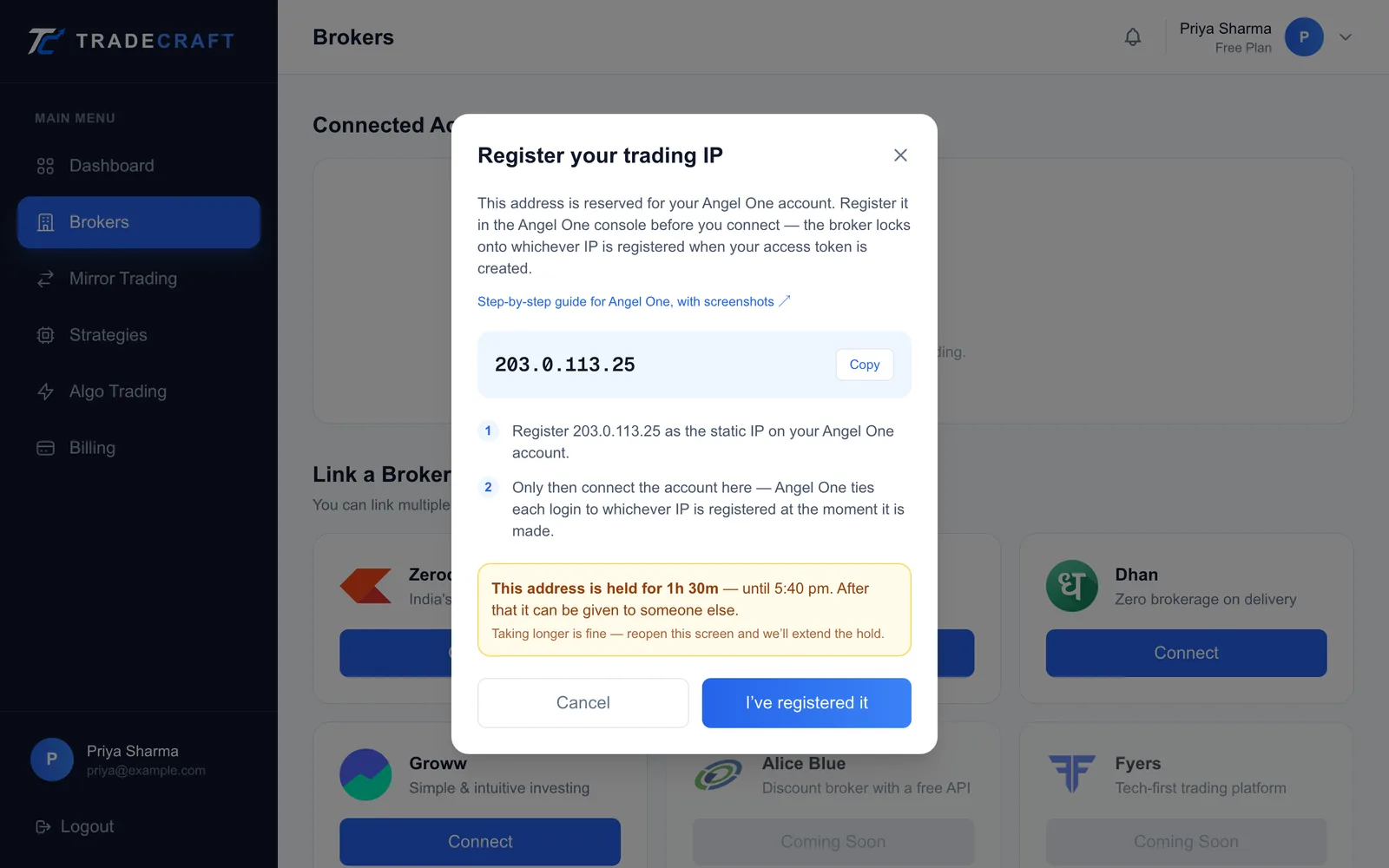
- Log in to TradeCraft and open Brokers in the sidebar.
- Under Link a Broker Account, find Angel One and click Connect.
- The Register your trading IP window opens with an address. Click the copy button next to it.
Step 2: Log in to SmartAPI
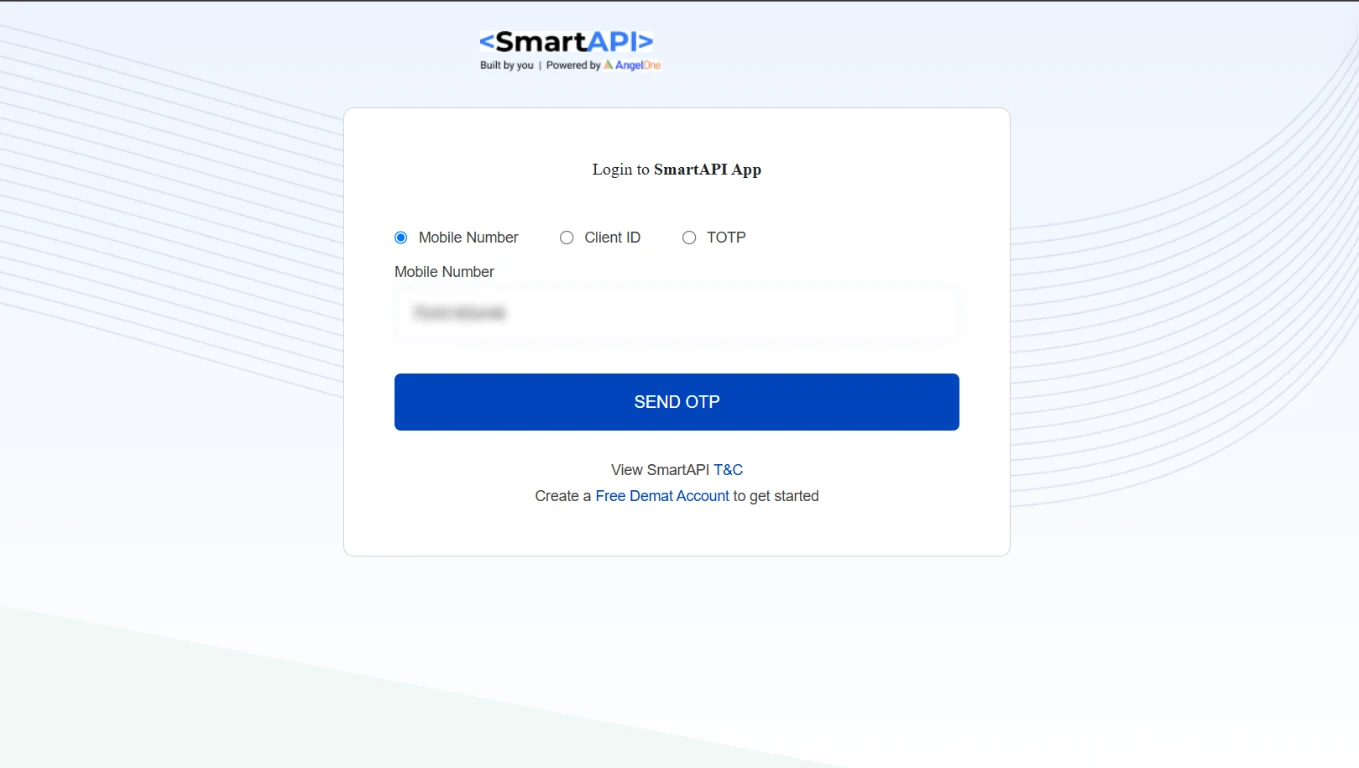
- Open smartapi.angelone.in and click Login. Choose the new login, not the old one.
- Pick Mobile Number or Client ID, enter it, click Send OTP and enter the OTP.
- Enter your PIN.
You do not need a separate developer account: this is your normal Angel One login.
Step 3: Add an app with your static IP
- Open My APIs. The page is headed My Smart API & Apps.
- Click + Add App.
- Fill in the form:
| Field | What to enter |
|---|---|
| App Name | TradeCraft (20 characters at most) |
| Redirect URL | https://gettradecraft.com/auth/broker/angel_one/callback |
| Post back URL (Optional) | Leave empty |
| Primary Static IP | The IP from Step 1 |
| Secondary Static IP (Optional) | Leave empty |
- Click Add.
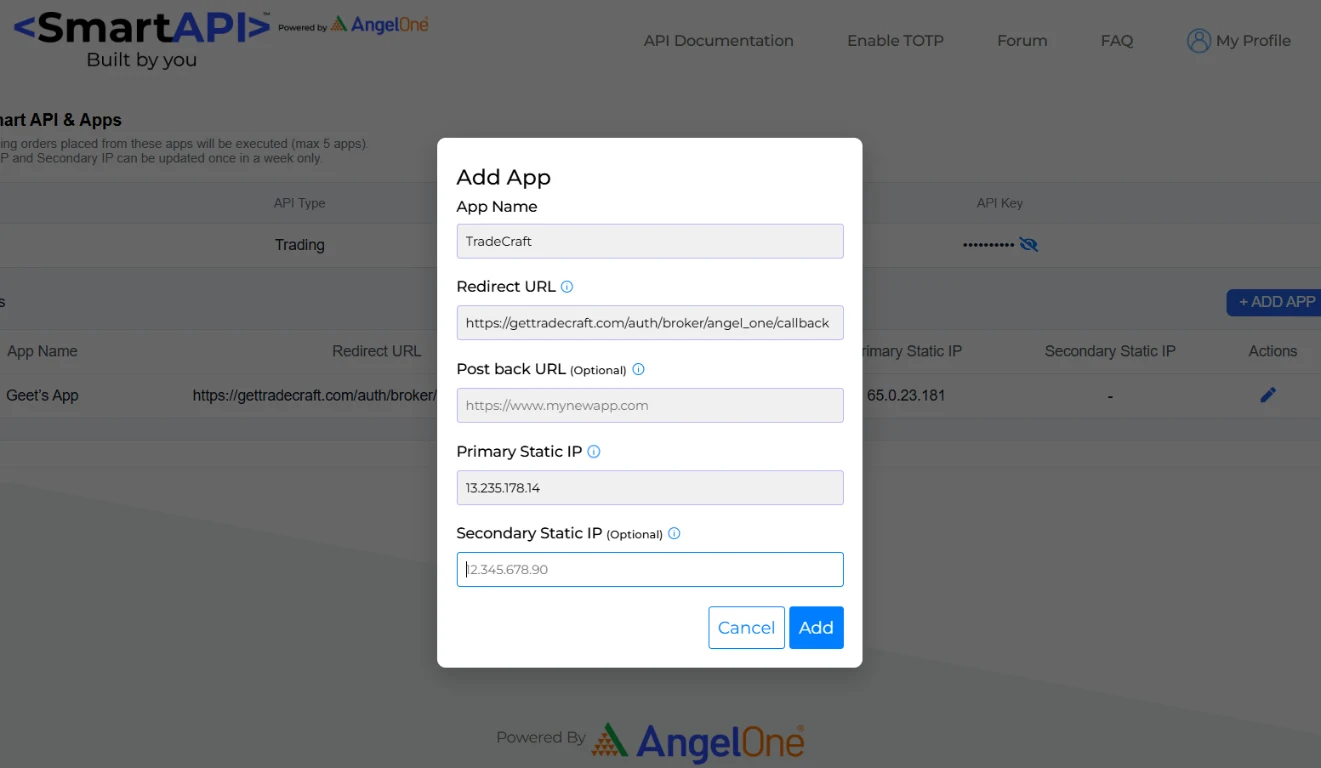
SmartAPI requires a Redirect URL, but TradeCraft never sends you through it. Use the one above so the field is valid.
Step 4: Copy your API Key
Your new app appears in the list. Click the eye icon next to API Key to reveal it, then copy it.

Step 5: Enable TOTP and copy the secret
- Open smartapi.angelone.in/enable-totp, or click Enable TOTP in the menu.
- Enter your Angel One Client ID and PIN.
- Enter the OTP sent to your registered email and mobile, and click Proceed.
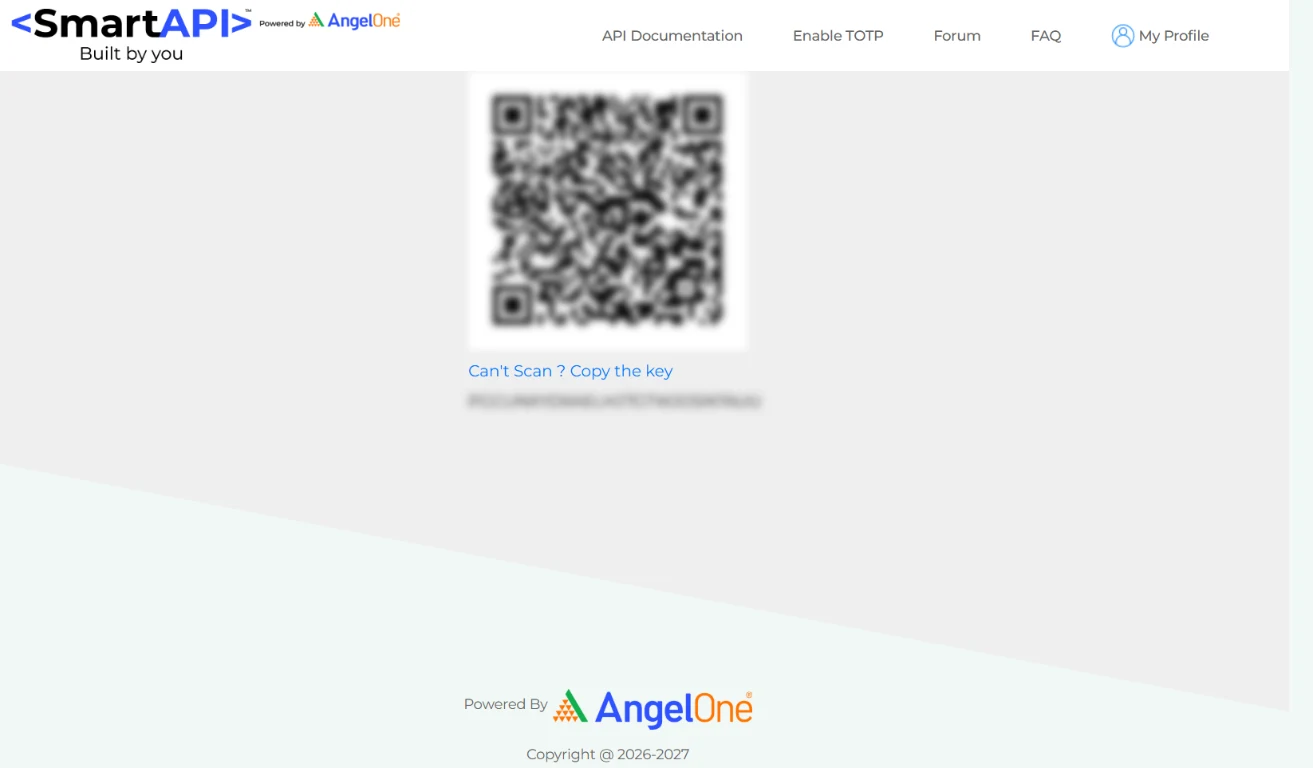
- A QR code appears. Below it, click Can't Scan ? Copy the key. This key is your TOTP secret. Copy it.
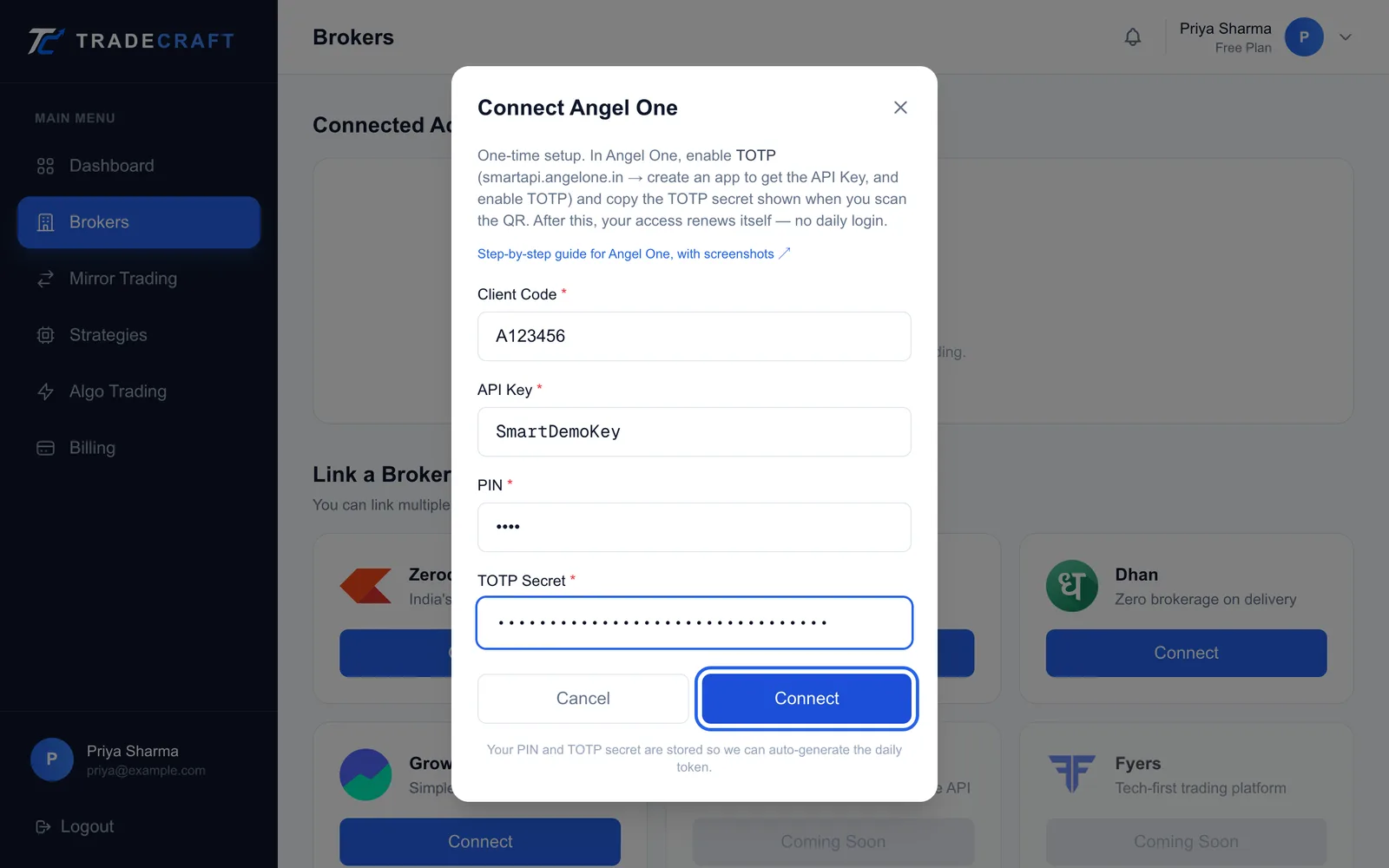
Step 6: Connect in TradeCraft
- Go back to the TradeCraft tab. In the Register your trading IP window, click I've registered it.
- The Connect Angel One window opens. Fill in:
| Field in TradeCraft | What to paste |
|---|---|
| Client Code | Your Angel One Client ID |
| API Key | The API Key from Step 4 |
| PIN | Your 4-digit Angel One login PIN |
| TOTP Secret | The key from Step 5 |
- Click Connect. You'll see Angel One connected. Its access renews itself — no daily login.

After you connect
There is nothing to do each day. Angel One ends every API session at midnight, and TradeCraft starts a new one for you. If the account ever shows Session expired, click Reconnect. It renews without asking you for anything.
If you reset TOTP or change your PIN at Angel One, TradeCraft's copy stops working. When the account next shows Session expired, click Reconnect: the renewal fails, TradeCraft asks for your details again, and you enter the new ones.
If something goes wrong
| What you see | What it means | What to do |
|---|---|---|
| Could not compute Angel One TOTP | What you pasted is not a TOTP key | Paste the key from Can't Scan ? Copy the key, not a 6-digit code |
| Angel One login failed with Invalid totp (AB1050) | The TOTP key is wrong, or TOTP was reset after you copied it | Redo Step 5 and paste the new key |
| Angel One login failed with Invalid Client ID (AB9003) | The Client Code has a typo | Copy it again from your Angel One profile |
| LoginbyPassword is not allowed | You entered your password instead of your PIN | Enter your 4-digit login PIN |
| Invalid API Key | The API Key is wrong, or belongs to an old app | Copy the key from the app you made in Step 3 |
| Primary Static IP is already associated with another app | That address is on another SmartAPI app | Contact TradeCraft support before changing anything |
Still stuck? Write to [email protected] with the exact error message. Never include your PIN or TOTP key.
Key takeaways
- SmartAPI is free. Create one app, with the TradeCraft IP as its Primary Static IP.
- The IP can be changed only once a week, so check it before you save.
- Paste the key from Can't Scan ? Copy the key, and your 4-digit PIN, not your password.
- Connect once: after that, your Angel One access renews itself.
Frequently asked questions
- Is Angel One SmartAPI free?
- Yes. Angel One does not charge for SmartAPI, including historical data.
- Do I have to log in to Angel One every day?
- No. Angel One ends every API session at midnight, and TradeCraft starts a new one for you. If the account ever shows as expired, click Reconnect in TradeCraft and it renews without asking you for anything.
- Which PIN does TradeCraft ask for?
- Your 4-digit Angel One login PIN (MPIN) — the one you use to log in to the Angel One app. Not your trading password, and not a TOTP code.
- What should I put in the Redirect URL field?
- SmartAPI requires one, but TradeCraft does not use it. Enter https://gettradecraft.com/auth/broker/angel_one/callback.
- Can I change the static IP later?
- Once a week. Angel One lets you update the primary and secondary IP only once a week, so check it carefully before you save.
Want to try this yourself?
TradeCraft lets you build a strategy, backtest it against historical data, and deploy it on paper before risking a rupee — using your own broker account.
About the author
Geet Ramchandani
Founder & Engineer, TradeCraft
Geet is the founder of TradeCraft, a platform built for retail traders to automate their strategies and mirror trades across broker accounts. With 5+ years of experience trading the markets and hands-on experience with algorithmic trading, he writes about trading systems, execution, backtesting, risk, and what it takes to build them in the real world.
Keep reading
- BrokersWhat Is Mirror Trading? How to Copy Trades Across Broker AccountsOne master account, and everything you trade there shows up in your others — even at a different broker. What it does for you, how to switch it on, and the limits worth knowing before you lean on it.
- BrokersHow to Connect Your Zerodha Account to TradeCraft (Free Kite Connect API)Create a free Kite Connect app, register the static IP TradeCraft gives you, and paste two keys. Every screen, in order, plus what to do when Zerodha says no.
- BrokersHow to Connect Your Dhan Account to TradeCraft (Free DhanHQ API)Register the static IP TradeCraft gives you, switch on TOTP in Dhan, and paste three details. Set it up once and it stays connected — every screen, in order.